Introduction
This November 2026 update tells car‑buying enthusiasts exactly how to evaluate advanced driver‑assistance systems (ADAS) on late‑model used cars (roughly 2018–2026). You’ll get a current, step‑by‑step lot checklist, road‑test procedures, updated cost ranges for recalibration and repairs, new items to watch for this fall — notably tighter disclosure expectations, more pervasive over‑the‑air (OTA) activity and subscription gating — and concrete negotiation language you can use at purchase.
Who this is for: buyers shopping privately or at dealerships for vehicles that advertise adaptive cruise control, lane‑keeping or lane‑centering, automatic emergency braking (AEB), blind‑spot detection, parking assist, or hands‑free driving. Why this matters: ADAS problems can be invisible but affect safety and ownership cost; in late 2026, software and account issues are as likely to bite buyers as mechanical or collision repairs.
Prerequisites / Context
Before you go look at a car, prepare these items so you can verify features and document anomalies:
- The vehicle VIN and exact advertised trim to confirm factory‑installed ADAS features using the manufacturer build sheet or Monroney sticker.
- A recent vehicle history report (CARFAX, AutoCheck) and the ability to search manufacturer recall/owner portals for VIN‑specific service or OTA logs.
- A smartphone for timestamped photos/videos, a flashlight for inspections, and a second person to help with road‑test checks.
November 2026 context you should know:
- OTA updates are routine for many brands (Tesla, GM, Hyundai/Kia, BMW, Mercedes, and others). OTA can change ADAS behavior between inspection and handover — ask for a software snapshot and add it to the purchase paperwork.
- Subscription gating of advanced features has proliferated. Some lane‑centering and hands‑free functions may be account‑ or VIN‑gated and will not work unless the subscription or account transfer is arranged.
- Consumer groups and service networks have pushed for clearer calibration and repair disclosure; many dealers now provide VIN‑linked calibration receipts on request, though practices vary by region and brand.
Step 1 — Before you visit: research and red flags
Do this desk work first so you know what to expect and what to flag at the lot or in a private sale.
- Confirm the ADAS package for the exact year/trim. Manufacturers sometimes shift which features are standard vs optional across model years — use the build sheet or Monroney information tied to the VIN.
- Pull a vehicle history report and specifically screen for collision claims that involve the front end, windshield, A‑pillars or suspension. These areas matter to cameras, radars and mounting geometry.
- Search the manufacturer owner portal or dealer service records (if available) for recall work, calibration events, or ADAS‑related firmware updates tied to the VIN.
- Check owner forums and recent owner reports for model‑year issues (use them for context — not proof). If multiple owners report persistent false‑positives or AEB nuisance braking on the same model year, treat it as a higher‑priority test on your road drive.
- Ask the seller whether any ADAS features require a subscription or an account and whether that subscription transfers with the vehicle. If transferability matters, get the seller’s written confirmation of transfer or reimbursement strategy.
Step 2 — On the lot: structured ADAS inspection checklist
Bring a phone, flashlight and a helper. Time‑stamped photos and video are your evidence for negotiations.
Exterior and visible components
- Windshield and camera area: inspect the glass behind the rearview mirror for chips, cloudy resin, mismatched seals or aftermarket windshields. Camera‑based ADAS often mounts here; any replacement without a calibration receipt or explicit dealer note is a red flag.
- Front bumper/grille: look for paint mismatches, uneven panel gaps, new bolts or missing clips. Radar modules usually sit behind the bumper — evidence of removal or repair suggests further inspection.
- Sensor housings, lenses and mirror pods: check side mirrors for blind‑spot sensors, the rear bumper for parking sensors, and the lower front fascia for ultrasonic sensors. Warped or misaligned housings reduce accuracy.
- Wiring and connectors: where visible, inspect for aftermarket splices or non‑OEM fasteners; these often indicate prior repairs that could affect sensor function.
Interior, displays and diagnostics
- Startup checks: power on and note any ADAS or master warning lights. A persistent ADAS fault lamp that does not clear with warm‑up or that reappears during simple maneuvers should prompt a specialist scan.
- Settings and software snapshot: open ADAS menus, capture screenshots of feature status, software/firmware versions and the last update date. Ask whether automatic updates are enabled and whether they can be disabled until sale.
- Driver monitoring: if the vehicle offers hands‑free operation, confirm the presence and apparent positioning of interior cameras or steering‑torque sensors and perform a simple attention check while the system engages.
- Account/subscription indicators: look for menu messages like “activation required,” “trial expired,” or “feature unavailable.” Ask the seller to demonstrate the feature working in its present state.
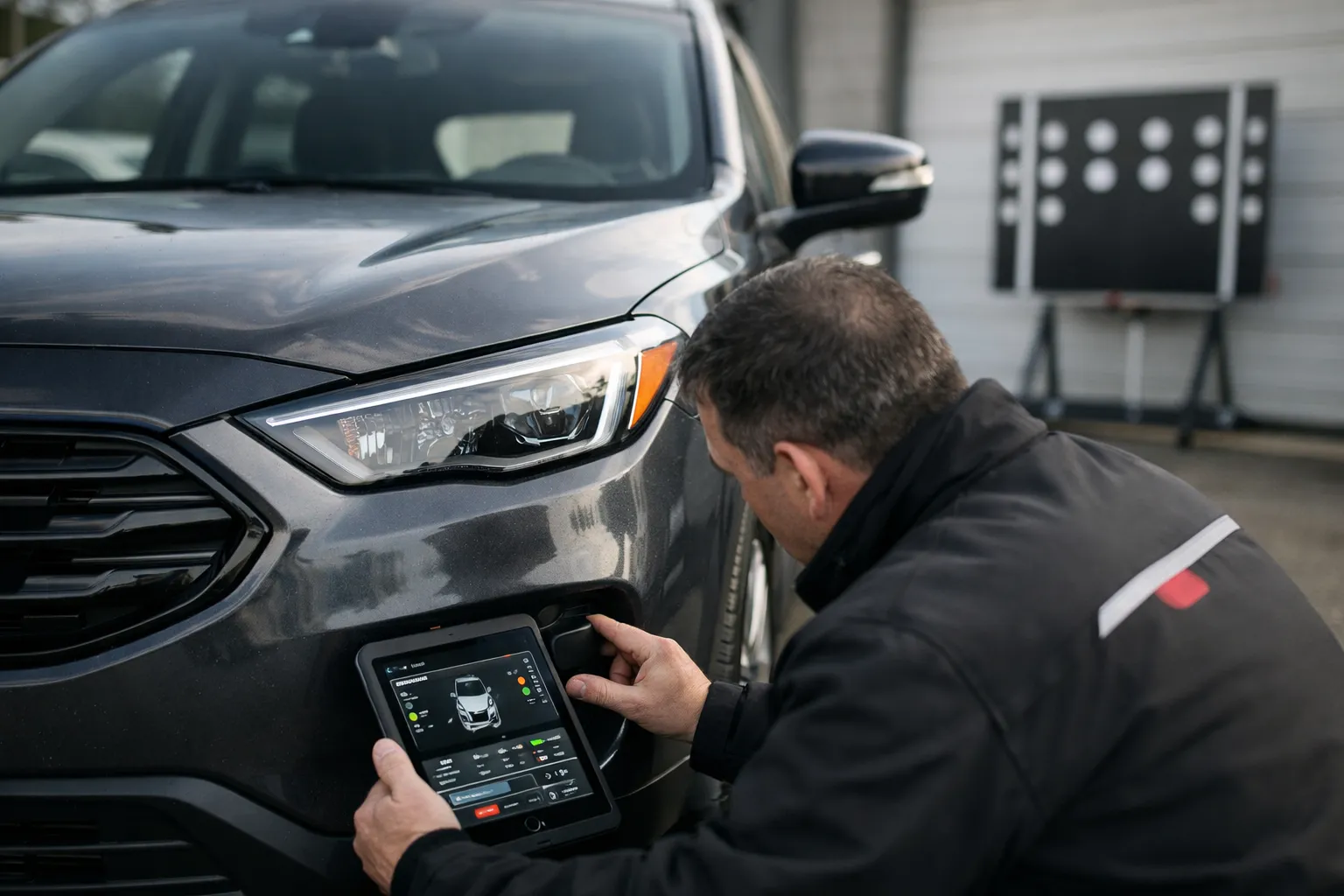
- Basic diagnostic scan: if the seller agrees, connect a VIN‑capable scan tool (dealer or independent) to check for ADAS‑related diagnostic trouble codes (DTCs). Generic OBD2 readers usually do not see module‑specific ADAS codes; insist on a shop or dealer scan if you suspect a problem.
Step 3 — Road test: safe, focused ADAS function checks
Conduct these tests in low‑risk locations and at safe speeds. Know the system’s limits from the owner’s manual.
- Adaptive Cruise Control (ACC): on a quiet highway, engage ACC and verify it maintains set speed, respects a selectable following distance, and brakes smoothly for slower traffic. Watch for unexpected decelerations or an inability to detect lead vehicles.
- Lane‑Keeping / Lane‑Centering: use a straight, well‑marked road at the system’s minimum operating speed. Observe lane‑centering behavior and any audible/visual alerts when you intentionally drift (do so safely and predictably).
- Blind‑Spot and cross‑traffic alerts: with a helper in a nearby lane or standing at a safe distance behind the car, confirm visual and audible alerts while changing lanes and during a controlled reverse with a helper outside the vehicle.
- AEB observation: don’t stage collisions. Note the system’s behavior during normal stops or when a lead vehicle slows abruptly. Ask the seller for any logged AEB events or a diagnostic printout from a dealer if a hard stop has been recorded.
- Parking assist and sensors: approach a known obstacle slowly and note distance readouts and chime timing; inconsistent readings suggest misaligned sensors or faulty modules.
Why these tests matter: ADAS performance can degrade without visible damage. How systems behave during use indicates calibration, sensor cleanliness, and up‑to‑date software.
Step 4 — When to require an ADAS specialist inspection
Order a professional ADAS inspection (and obtain a written report) if you see any of the following:
- Persistent ADAS warning lights or inconsistent system behavior during road testing.
- Collision history involving the front end, windshield or A‑pillars, even if cosmetically repaired.
- Recent windshield or bumper replacement with no documented calibration or a missing OEM part number on the invoice.
- Aftermarket bumpers, windshields, or altered sensor housings that change sensor geometry.
- Subscription or software anomalies, such as features listed as “disabled” pending activation or an active account tied to a previous owner.
Specialist shops use target boards, OEM alignment tooling and dealer‑level scanners (commonly Autel, Bosch, Hunter, Launch and OEM factory tools). Their written report should state whether static calibration was done, whether dynamic road validation was required, and whether any modules need replacement or reprogramming.
Step 5 — Updated Nov 2026 calibration and repair cost guide
Costs vary by region, vehicle and shop. Typical late‑2026 U.S. ranges (approximate):
- Windshield camera recalibration (static): $200–$475
- Radar recalibration (static or dynamic): $275–$950
- Full multi‑sensor recalibration (dynamic/dealer level): $500–$1,600+
- Sensor replacement (camera/radar/LiDAR module where present): $400–$2,200+ per sensor depending on OEM pricing and licensing
What’s changed since mid‑2026:
- OTA fixes continue to resolve algorithm and false‑positive issues, but they don’t fix physical misalignment or damaged mounts — a shop is still required for calibration or replacement.
- Independent shops increasingly advertise OEM‑grade calibration using Autel, Hunter or factory‑licensed tooling; ask for tool/software version and a sample VIN‑linked calibration report.
- Some OEMs now offer dealer portals that can produce a VIN‑linked OTA and calibration history; use that to verify the most recent ADAS firmware and calibration dates.
Step 6 — Documentation to demand from the seller or dealer
Before completing a purchase, require these documents or digital records:
- Receipts for windshield, bumper or sensor repairs and explicit recalibration invoices that include VIN, date, shop name, equipment used and whether static or dynamic calibration was performed.
- A clear disclosure of any ADAS warning lights, unresolved DTCs, or recorded AEB events.
- Proof of recent OTA software updates and the date of the last ADAS‑related firmware change (screenshot or dealer printout).
- If features are subscription‑gated, written confirmation that the subscription will be transferred, temporarily extended, or that the seller will reimburse the buyer for activation costs.
- A short road‑test verification signed by a technician or inspector listing which ADAS functions passed basic checks.
Step 7 — Negotiation language and tactics based on ADAS findings
Use documented ADAS issues to adjust price or require remediation. Practical approaches:
- If recalibration is needed and the seller refuses to pay, reduce your offer by a conservative estimate of recalibration plus a margin (as of Nov 2026, $500–$1,000 is a reasonable ballpark for many simple recalibrations) or require the seller to complete calibration by a named shop before transfer.
- For missing calibration receipts after visible repairs, treat the vehicle as if calibration is required and either request a price reduction or insist on a post‑sale calibration at the seller’s expense written into the contract.
- If sensor replacement or repeated faults are likely, obtain a written shop estimate and demand a price reduction equal to that estimate or that repairs be completed by a certified shop before purchase.
- For subscription‑locked features, factor the subscription cost and transferability into valuation — request written confirmation of transfer or a seller credit that covers at least 12 months of the subscription to preserve resale value.
Insurance, warranty and resale — late‑2026 considerations
Tell your insurer about major ADAS component replacements; some carriers ask for disclosure of prior crash repairs when underwriting. Certified pre‑owned (CPO) programs increasingly verify ADAS calibration and may include limited ADAS coverage — read exclusions, especially those involving aftermarket parts. Keep VIN‑linked calibration invoices and OTA logs; buyers now expect this documentation and it raises resale value.
Common mistakes to avoid
- Assuming a clear dashboard light equals healthy ADAS — physical sensor damage or missing calibration receipts still matter.
- Relying on vague seller statements like “software fixes it” when physical misalignment or damaged mounts are probable.
- Failing to confirm whether advanced features are tied to a personal account (email/phone) rather than the VIN.
- Skipping a specialist inspection when the vehicle shows prior front‑end repairs or recurring ADAS warnings.
Pro tips
- Ask for a screenshot of the vehicle’s ADAS software/firmware version and last update date; add that screenshot to the sales contract as an exhibit.
- If a dealer offers to include calibration, require the contract to name the shop, state the calibration method (static/dynamic), and commit to a VIN‑linked invoice delivered at handover.
- Get any account‑based features (digital keys, driver profiles, subscriptions) removed from the seller’s personal account and show the feature active under a neutral VIN or account prior to final payment.
- Use independent calibration shops that publish the tooling and software versions they use — many will issue a written calibration certificate useful for future resale.
Tools and resources (Nov 2026)
- Manufacturer owner portals and dealer service centers — request VIN‑linked OTA and calibration histories.
- NHTSA recall lookup (nhtsa.gov) — VIN search for safety recalls and manufacturer notifications.
- Vehicle history reports — CARFAX, AutoCheck (look for collision and glass claims).
- Local ADAS calibration shops — ask which scanner/tool brand they use (Autel, Hunter, Bosch, Launch, OEM) and for a sample calibration report tied to a VIN.
Final pre‑purchase quick checklist
- Confirm advertised ADAS features match VIN and trim.
- Inspect windshield, bumpers and sensor housings for recent repairs; photograph everything.
- Power on and note ADAS warnings, software/OTA info and subscription status (capture screenshots).
- Perform controlled ADAS function tests on the road with a helper; request a diagnostic scan if any faults appear.
- Request and review calibration and repair receipts; if in doubt, order a professional ADAS inspection before purchase.
Bottom line
By November 2026, ADAS is standard on most late‑model used cars and inspection must include software and account checks as well as physical condition. OTA updates and subscription business models add new layers to the buying process, but fundamentals remain: verify function, verify service history, and demand clear documentation. A VIN‑linked calibration receipt and OTA snapshot are now as important as any mechanical inspection item. Use specialists when necessary and get promises in writing — that will protect safety and resale value.
FAQ
How can I prove a subscription‑gated ADAS feature will transfer to me?
Ask the seller to demonstrate the feature working on the vehicle in your presence and request written confirmation of transfer from the seller or the OEM. Ideally, have the seller start a transfer process (or a grace period extension) with OEM support and provide a screenshot or dealer printout showing the transfer status tied to the VIN.
Can an OTA software update remove an ADAS warning light I find during inspection?
Possibly, if the issue is caused by a software bug or false‑positive. However, OTA updates cannot correct physical misalignment, damaged mounts, or improperly installed parts. If any hardware change or calibration is likely, require a shop inspection and a written calibration report, not just an OTA update promise.
Is a dealer calibration always necessary, or can independents do the job?
Not always. Dealers often have direct OEM software and proprietary licenses for complex programming, but many independent shops now use OEM‑grade tools (Autel, Hunter, Bosch, Launch) and trained technicians and can provide equivalent calibration at lower cost. Ask for the specific tool and software version and a VIN‑linked calibration certificate before relying on the service.
What should I do if the seller refuses to provide calibration receipts after a visible windshield or bumper replacement?
Treat that as a material defect. Either (a) negotiate a price reduction that covers the expected calibration cost plus a margin, (b) require the seller to have calibration performed by a named shop before sale, or (c) walk away if the seller refuses to document or remediate potential safety issues.
Can I protect myself from OTA changes between inspection and delivery?
Yes. Ask the seller/dealer to disable automatic updates until after the sale or provide a signed agreement that the vehicle will remain at the inspected software level until handover. Capture a software snapshot (screenshot with date/time) and include it in the sales paperwork as a baseline. If the vehicle is updated, request the same baseline be restored or renegotiate based on any functional change.